Most people shooting video alone do not have a sound person, and it shows. The camera is fine. The lighting is fine. The audio sounds like it was recorded in a hallway, because it was. The phone or camera sat six feet from the mouth, aimed at a bare wall, and the built-in mic captured the room instead of the person.
A wireless mic setup for creators fixes most of that in one move. It puts the capsule a few inches from the person talking, which is the largest single upgrade available to anyone who records dialogue: a YouTube video, a client testimonial, a course module, or a two-person interview at a kitchen table.
I have edited more than 4,000 episodes of other people's audio, and the pattern is boringly consistent. The gear is rarely the problem. Placement is. What follows is the setup I would run if I were starting today with a phone, a small wireless kit, and no budget for a studio.
Why you should trust me
I am a podcast editor and audio engineer in Brooklyn. I run a small studio where I record voiceover and teach podcasters how to sound good, and most of the audio that lands in my inbox every week was recorded in a kitchen or a bedroom with a bare wall behind the talker. I have spent years listening to what survives an edit and what does not, and I keep notes on it. My bias is simple and it does not change: a microphone you are not afraid to use beats a better microphone that stays in the drawer.
How I picked what is in this guide
I judged both options here on four things, in this order.
- Placement. Does the mic sit where dialogue sounds right, a few inches from the mouth or in the middle of the table, without you holding it?
- Room rejection. Does it favor the voice in front of it over the room around it? Off-axis rejection matters more than frequency response for anyone recording near a street, a fan, or a refrigerator.
- Fit with what you own. Does it work with the phone or camera already in your bag, or does it demand an interface, an adapter chain, and a new ecosystem?
- Does it hold still. Does the clip or the stand survive a 40-minute session without sagging, sliding, or picking up the table it sits on?
I did not rank these on spec sheets. Spec sheets brag about frequency response nobody can hear. The two products below win on placement and on how much of the room they let in, which are the two things you can actually hear in the finished file.
The gear I would start with
There are two honest ways to mic a solo or small-crew shoot. A clip-on wireless kit puts a transmitter on the person. A tabletop speakerphone mic sits in the middle of the group. They solve different problems, and if you record both kinds of video they coexist fine on the same desk.
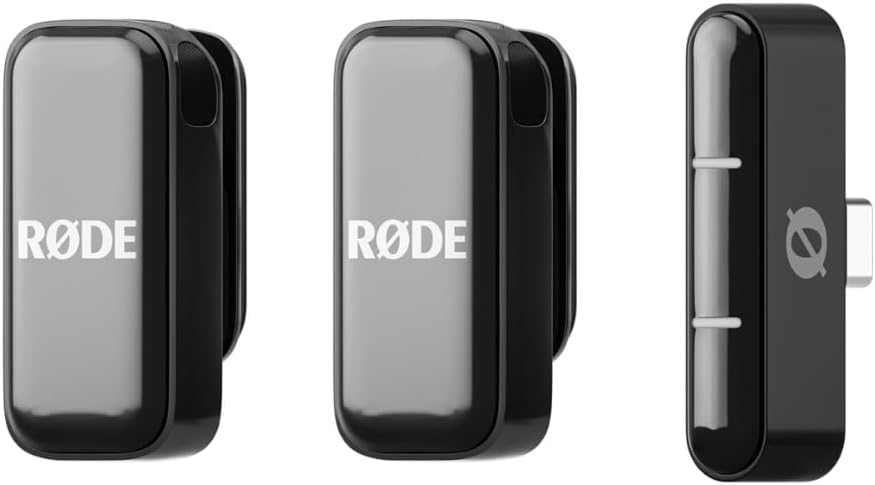
Our pick: RØDE Wireless Micro (2 Mics + Charging Case), USB-C for iPhone & Android
 Visit on Amazon →
This is the kit I would hand a solo creator first. Two transmitters means two people can be mic'd at once, which covers interviews, co-hosted videos, and the two-person client testimonial that always shows up on the calendar. The charging case matters more than it sounds: the classic failure mode for wireless kits is a dead transmitter twenty minutes into a shoot, and a case that stores and charges both mics removes that entire class of disaster. The USB-C receiver is aimed at the phone most creators are actually shooting on, rather than at a camera rig they do not own yet.
Placement is the whole point of the thing. Clip a transmitter on the shirt placket, six to eight inches below the chin, strain-relieve the cable so it does not tug on the capsule, and you have solved the distance problem that ruins phone audio.
Flaws but not dealbreakers: Two mics and a case is not a studio. If your video is a four-person panel around a table, this kit runs out of transmitters and you are back to a tabletop solution.
Anyone who shoots talking-head video, interviews one or two people, or records voiceover to picture on a phone should start here.
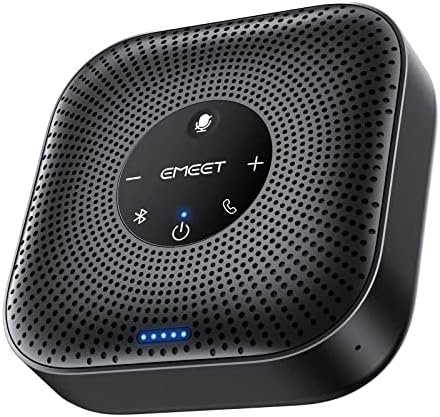
The tabletop pick: EMEET M0 Plus Conference Speaker and Microphone, 4 Mics 360° Voice Pickup
 Visit on Amazon →
This is a different tool for a different shoot. Four mics with 360-degree pickup means one device on the table captures everyone sitting around it, which is exactly what you want for a group recording, a podcast roundtable, a client call you are also capturing for B-roll, or a desk setup where you are talking to camera and to a remote guest at the same time. It is also a speaker, so the same box handles the listening side of a call.
The tradeoff is honest: a tabletop mic hears the table. Set a mug down, tap a pen, shuffle a script, and it is in the file. It also hears more of the room than a chest-worn capsule does. Use it when the group is the point, and put something soft under it if the table rings.
Flaws but not dealbreakers: Because this is a conference device first, check that your computer or phone offers the connection it needs before you order. If your device does not, this is the wrong pick no matter how good the pickup pattern is.
Anyone recording group conversations, remote interviews, or a desk-based show with guests on a screen should keep one of these on the table.
The setup, step by step
This workflow assumes a phone or a camera and one of the mics above. It takes about 15 minutes the first time and two minutes after that.
Step one: pick the mic for the shot, not for the gear closet. One person talking to camera gets a clip-on transmitter. Three or more people around a table get the tabletop mic. Do not split the difference and park a tabletop mic six feet in front of one person. You will get room tone with a voice somewhere inside it.
Step two: treat the room as far as you can for free. The room is the microphone. Before you touch a gain knob, do the free work: close the window, kill the HVAC and the ceiling fan, put a rug or a blanket behind the person talking if the wall is bare, and move the shoot away from the refrigerator and the street-facing window. Foam panels are not required. A closet full of clothes and a sofa cushion behind the camera are real acoustic treatment.
Step three: place the capsule. For a clip-on, six to eight inches below the chin, on the placket or the collar, aimed up at the mouth. Not under the fabric, not on a zipper, not on a lanyard that swings while you gesture. For a tabletop mic, put it in the middle of the group, on a cloth or a mat rather than bare wood, and nudge it slightly toward whoever talks the most.
Step four: manage the cable and the clip. Loop the cable once and clip it down so a head turn does not yank the capsule. This is the step people skip, and it is the step that ruins takes. A clip that sags or a stand that slides turns a good mic into a bad recording, which is why mounts and clips matter more than the next mic upgrade.
Step five: set levels before the first take, not after. Have whoever is on camera say the loudest line of the script three times. Set gain so those peaks land well below the top of the meter and leave headroom there. If the meter touches the ceiling, you are clipping, and clipping cannot be fixed later. Gain staging is a habit, not a setting.
Step six: record 30 seconds of room tone and a 30-second test. Listen on headphones. Check for plosives on the P and B sounds, check for the HVAC kicking in, check for the phone buzzing on the table. Fix it now, when it costs you a minute, instead of in the edit, when it costs you a re-record.
Step seven: know your pickup pattern while you record. Off-axis rejection is the reason a chest-worn capsule survives a head turn. If you turn 45 degrees away from the mouth, a clip-on still works and a tabletop mic still works. Know which mic you bought and stop apologizing for the room in the middle of a take.
Step eight: listen back on the worst speaker you own. Play the test on a laptop speaker, then on a phone speaker. If the dialogue holds up there, it holds up anywhere. If it only sounds good in your headphones, you have not finished yet.
Where people go wrong
Recording in the room you also monitor in. If the mic is live and the speakers are on, you are recording the room twice. Use headphones, every time.
Chasing the upgrade. A hundred-dollar dynamic in a halfway-treated room beats a four-hundred-dollar condenser in a bare one, and I will keep saying it. The upgrade treadmill is a hobby, not a fix.
Leaving the mic on the desk stand. Every desk stand transmits typing, mouse clicks, and the bump when you reach for coffee. Get the mic off the desk surface or put something soft under it.
Ignoring the software layer. On-mic DSP and companion app EQ are the battleground now. Learn what your device already does before you stack plugins on top of it, or you will apply two corrections to the same problem.
Rolling the whole session in one take. Record room tone, record a test, listen, then roll. Thirty extra seconds of setup saves entire sessions.
The competition and why it lost
There are other ways to mic a video, and most of them lose for a specific reason.
The built-in mic on your phone is free and genuinely fine for ambient sound and scratch audio. It loses because it has to live where the phone is, and the phone is not near the mouth. Keep it rolling as a backup track and nothing else.
A wired lavalier is cheaper and gets you close to the same placement. It loses on the tangle. One cable running to a pocket, one wrong move mid-shoot, and the whole take has a rustle in it.
A shotgun mic on a boom is the right tool for a film crew and the wrong tool for a solo creator, because it needs an operator or at least a stand and a very specific aim.
A USB condenser on the desk is the classic first purchase, and it is a good one if you record in a treated room and sit still. In a bare room with a street outside, it hears the street.
An interface plus an XLR dynamic mic is the path for people who know exactly why they need it. It is a fine path. It is not the first purchase.
What this all costs
Check current Amazon price on both mics above. Neither is a studio purchase, and both replace a stand, a cable, and a mounting problem at the same time, which is the comparison that actually matters when you are building a first kit.
The other half of the budget is free. Closing a window, moving a shoot out of the kitchen, and turning off the ceiling fan cost nothing and change the recording more than any single piece of gear in this article. That is not a rhetorical point. It is the difference between a file you can edit and a file you have to re-record.
The short version
Your phone already shoots good video. The audio is the part you can fix this week. Put a capsule near the mouth, kill the room noise you can kill for free, set levels so nothing clips, and listen back on a laptop speaker before you publish.
Do that with either mic in this guide and your next video will sound like someone was paying attention. Because someone was: you.