Related: USB vs XLR Microphones: Which One Belongs on Your Desk
I have edited more than 4,000 episodes for other people, which means I have heard every way a home recording can go wrong. The pattern never changes. Someone spends real money on a microphone, sets it on a hard desk in a kitchen with hard floors, and then blames the gear when the audio sounds hollow and far away. So before we talk about parts, here is the rule I would tattoo on every new podcaster's forearm: the room is the microphone. A hundred dollar dynamic mic in a soft room beats a thousand dollar condenser in a hard one.
That is why this podcast microphone setup is short. Four pieces. Two mics that can actually carry a show, one arm that fixes more problems than any capsule swap, and one piece of hardware most people should walk straight past. No interface, no preamp, no upgrade treadmill. Here is what each piece does, who it is for, and where it falls short.
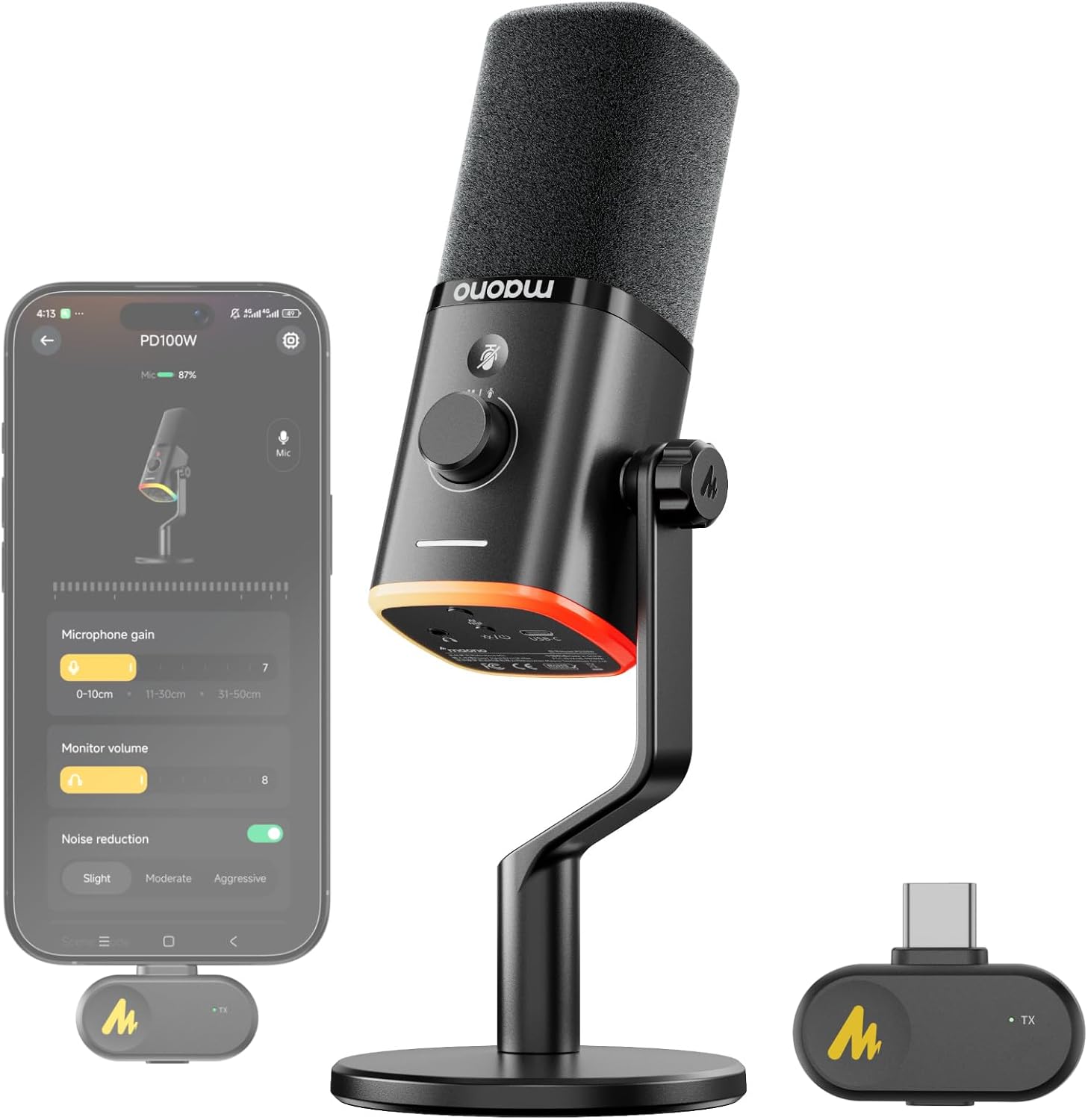
Best Overall: MAONO PD100W Wireless Dynamic Gaming Microphone for PC with USB-C Receiver
Ignore the word gaming in the name for a second. A dynamic capsule pointed at a mouth is a dynamic capsule pointed at a mouth, whether the person behind it is streaming a shooter or interviewing a guest about municipal water policy. The physics do not check your subscriber count. What matters here is that this is a dynamic mic, and dynamic mics are the correct first answer for almost every home recordist, because they are far less interested in your refrigerator hum and the traffic outside than a condenser would be.
The wireless part is the interesting part. The PD100W pairs with a USB-C receiver, so the receiver is effectively your interface. You plug it in, the computer sees an input, and you are recording. There is no preamp to gain stage, no cable running across the desk to a box you have to hide, and no reason to buy an interface until you know exactly why you need one. For a two person show where one host wants to stand up and pace, or for a creator who records in more than one spot in the apartment, that freedom is worth more than a spec sheet number.
The tradeoffs are the same tradeoffs that come with any wireless system. You now have a battery to think about, and a receiver that can be lost or left plugged into a laptop bag. Wireless audio shares airspace with Wi-Fi, so a congested apartment building is a real variable. And because the receiver is the interface, this is a closed path: what you buy is what you keep, and there is no later move to an XLR input without replacing the whole chain. If that sounds like a limitation to you, you already know you want the interface route. Everyone else should stop worrying about it.
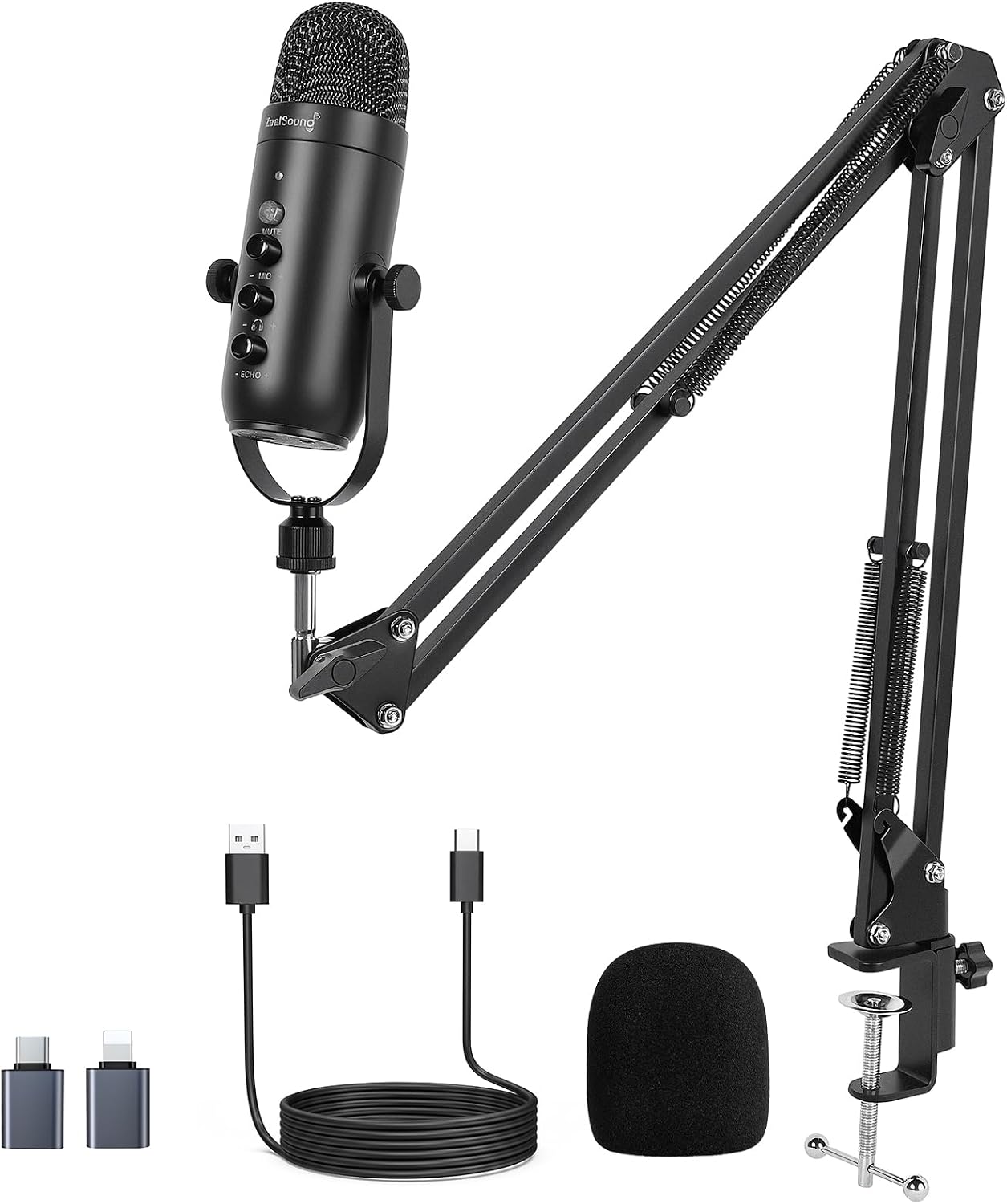
Best Value Bundle: ZealSound Podcast Microphone with Boom Arm
This is the bundle I hand to people who have never recorded anything and want to be making an episode tonight. The box includes the mic and the boom arm, which is the single most important accessory decision most beginners get wrong. It runs on USB, so it works with a PC or a Mac without a driver conversation, and it also works with an iPhone or Android phone, which matters more than people admit. Plenty of good shows have been recorded on a phone with a decent USB mic.
On the body you get a mute button, echo and volume control, and zero latency monitoring. That last one is genuinely useful and it is the feature beginners underestimate. Hearing yourself in real time is how you learn to stop rushing your sentences and how you catch a plosive before it ruins a take. The mute button earns its keep the moment a delivery truck backs up outside your window.
The controls are also the caveat. On-mic processing like echo and noise reduction is a convenience layer, and convenience layers tend to be blunt instruments. They help in an untreated room and they can make a good take sound slightly processed if you lean on them. My advice is to use them as little as you can get away with and to fix problems at the source: get closer, turn the gain down, hang something soft on the wall behind you. The bundled arm is also the piece that will eventually be the first thing you replace. It is fine to start with. It is not the last arm you will own.
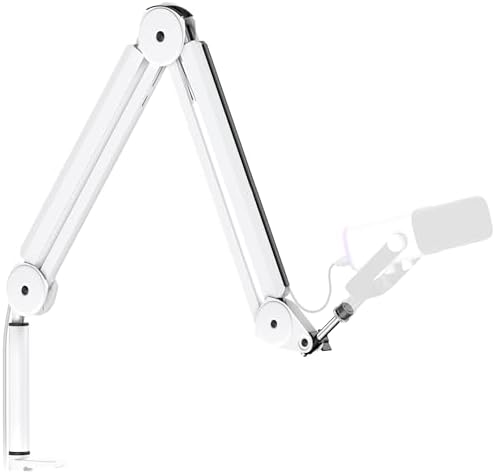
The Piece That Fixes the Most Problems: InnoGear Mic Arm
If you only change one thing about a beginner setup, change where the microphone sits. A mic on a desk stand picks up every keystroke, every mouse click, every mug you set down, and every low frequency thump the desk transmits into the capsule. I have heard a perfectly good three hundred dollar microphone sound like a bad phone call because it was sitting on the same surface as a mechanical keyboard.
This InnoGear arm is built around Blue Yeti class microphones and includes cable management along the arm, which is the detail I care about more than most reviewers do. A loose cable is not just untidy. It is a thing that catches on your chair, drags the mic out of position mid sentence, and transmits handling noise straight into the recording. Routing the cable along the arm gets it out of your hands and off the desk. The arm gets the capsule off the surface, which kills the mechanical thumps, and it lets you put the mic at the right distance instead of the distance your desk stand happens to allow.
Boom arms do have a failure mode, and it is sag. Cheap arms give up after a few months and slowly droop until the mic is pointing at your collarbone and you are leaning in to compensate. If you feel the joint slipping, tighten it, and if it will not hold, that is the signal to upgrade. Treat the arm as a consumable, not a heirloom.
The One I Would Skip: Astatic 302-636LB1
I want to be fair to this one, because the idea behind it is not stupid. A noise cancelling dynamic microphone built for close speech in a loud vehicle is, conceptually, exactly the kind of tight, room rejecting capsule a home podcaster should want. Close working distance, minimal pickup of everything else, built to survive being tossed around. If you could buy that capsule with a standard three pin XLR output and a warranty, it would be a genuinely interesting budget option.
That is not quite what this listing is. This is a CB radio microphone, sold in bulk packaging, and the version described carries a four pin CB connector, with an XLR variant listed alongside it. That means the first thing you have to solve is not audio, it is wiring. A four pin CB connector does not plug into an audio interface, so you would be hunting for an adapter or rewiring the cable before you ever hear a word through it. Bulk packaging usually means no retail box, and often no documentation.
For a first setup, that is a project, not a purchase. I am not telling you the capsule is bad. I am telling you that a beginner's first microphone should be the thing you are not afraid to use, and a mic that needs a wiring solution before its first recording is exactly the kind of gear that ends up in a drawer. If you are an experienced tinkerer who wants a tight dynamic capsule for almost nothing, go read the connector spec carefully first and confirm which termination you are actually buying. Everyone else, spend the money on the arm.
What I listen for before I recommend anything
Four things decide whether a mic works in a real apartment, and none of them are frequency response graphs.
The first is off-axis rejection. That is how much of the room the mic hears when it is not pointed at it. A mic with strong rejection lets you sit in a normal, imperfect room and still sound close and dry. A mic with weak rejection hands you your neighbor's dog and your own air conditioner. This matters more than any published response curve, and it is the reason I keep steering home recordists toward dynamics.
The second is how the mic behaves when your mouth gets close. Proximity effect is the bass boost you get as you move in, and every voice handles it differently. Some people need to back off an inch, some people sound better at two fingers from the grille. You learn this in an afternoon of recording the same paragraph at different distances, not by reading a chart.
The third is plosives, the little pops on P and B sounds. A pop filter or a slightly off-axis angle fixes almost all of it, and you should test that before you decide a mic is sibilant or harsh. Most harshness complaints I hear are actually a capsule being hit straight on by a hard consonant.
The fourth is the mount, and this is the one people skip. If the arm sags, if the stand rings, if the cable drags across the desk, the recording will sound amateur no matter what the capsule cost. Gain staging starts before the signal reaches the interface. Set your input level so your loudest sentence peaks well below the ceiling, leave yourself room, and fix the room tone at the source rather than with software.
The podcast microphone setup reference table
This is how I lay the four pieces out when someone asks me what to buy. Connection first, because that decides whether the mic even fits your computer. Then what the piece is actually for, and then the honest note about where it stops being enough.
| Piece | Connection | What it is for | Notes |
|---|---|---|---|
 Visit on Amazon → Visit on Amazon →MAONO PD100W Wireless Dynamic Gaming Microphone |
Wireless to a USB-C receiver | A dynamic capsule with no interface and no cable across the desk | Visit on Amazon →. Battery and receiver to keep track of. Closed path, no XLR move later. |
 Visit on Amazon → Visit on Amazon →ZealSound Podcast Microphone with Boom Arm |
USB, plus phone support over the right adapter | The fastest path from box to finished episode | Visit on Amazon →. Bundled arm is the first upgrade. Go easy on the echo and noise reduction controls. |
 Visit on Amazon → Visit on Amazon →InnoGear Mic Arm Microphone Boom Arm |
Desk clamp, no electronics | Getting the capsule off the desk and the cable out of your hands | Visit on Amazon →. Built around Blue Yeti class mics. Watch the joints for sag. |
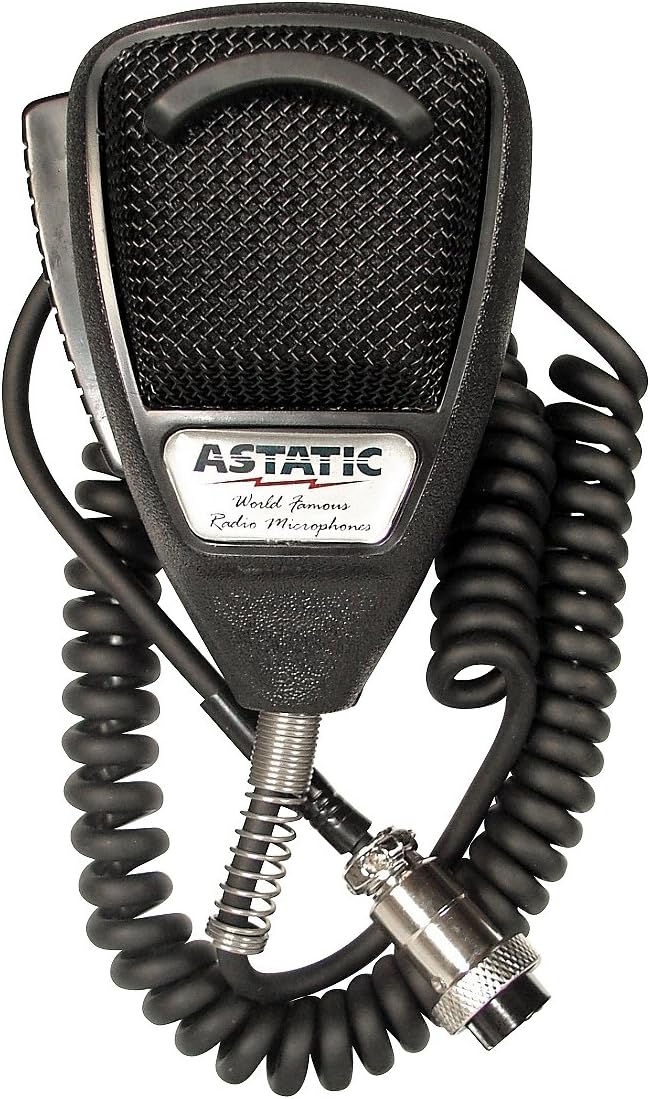 Visit on Amazon → Visit on Amazon →Astatic 302-636LB1 Noise Cancelling CB Microphone |
Four pin CB connector, with an XLR variant listed | A tight dynamic capsule for someone who enjoys solving wiring problems | Visit on Amazon →. Bulk packaging. Confirm the termination before you order. |
The table is not a ranking. It is a decision order. Connection decides compatibility, the arm decides whether the recording sounds like a person in a room or a person on a desk, and the capsule decides the rest.
Should you buy the MAONO PD100W?
Yes, if you want dynamic mic behavior without buying an interface. The wireless receiver removes the box, the cable, and the gain staging homework, and a dynamic capsule is the right tool for an apartment with traffic outside and a refrigerator humming in the next room. The honest cost is flexibility. You are committing to the receiver, and there is no later move to a different preamp without starting over.
If you record in one fixed spot, always at the same desk, and you already know you want an XLR signal path, this is not your mic. For everyone else, it is the one I would put first.
Should you buy the ZealSound Podcast Microphone with Boom Arm?
Yes, if the goal is to stop researching and start recording. The arm, the mute, the monitoring, and the phone compatibility in one purchase is a lot of problems solved at once, and it works out of the box on a PC or a Mac without an interface. The controls are conveniences rather than fixes, so use them sparingly, and expect to replace the arm somewhere down the line.
The bundle is the correct first purchase for most people, and the InnoGear arm is the correct second one.
Should you buy the InnoGear Mic Arm?
Yes, and sooner than you think. It is the cheapest change on this list that improves every recording you make afterward, and the cable management is the part that keeps the arm out of your way while you talk. If your mic currently lives on the same surface as your keyboard, this is the upgrade that finally makes your existing microphone sound like itself.