Every phone video has the same two audio problems, and neither one is the microphone. The first is that your mic is three feet from your mouth. The second is that it is also three feet from your fridge, your ceiling fan, and the delivery truck outside. A wireless lav mic for iPhone video fixes both at once, because it moves the microphone from the phone to your collar, where it sits inches from the source and inches from nothing else.
I have edited more than 4,000 episodes for other people, which means I have heard every way a good microphone can be wasted. The pattern never changes. The person with the expensive mic in the untreated room sounds worse than the person with the cheap mic clipped to their shirt. Placement beats price. The room beats both.
So this is the practical version. Two lavs that are worth your money at this stage, and the setup routine that makes either one sound like it cost more than it did.
Why you should trust me
I'm Jonas. I run a small studio in Brooklyn where I record voiceover and edit podcasts for clients, and I've been working in audio for over a decade. I've put more than 30 microphones through the same two rooms: a treated studio and my untreated kitchen, because most people record in an untreated kitchen and pretending otherwise doesn't help anybody. I keep spectrograms of every mic I test, mostly so I can stop arguing with my own memory.
My bias, stated up front: the room is the microphone. I can make a cheap mic sound usable in a good room, and I can make an expensive mic sound broken in a bad one. I don't do live sound or instrument mics, and I don't do DAW tutorials. Voice is the job.
How I picked
I'm not going to tell you I ran these two on a measurement bench, because I didn't. What I can tell you is what I check before I hand a lav to somebody who has never used one, and both of the mics below clear that bar.
Does it clip to actual clothing? A lav that sags, spins, or slides down a collar is worse than no lav at all, because you'll stop using it.
Does the capsule sit off the fabric? A capsule flat against a cotton shirt records the shirt, not the voice.
Does it work with the phone you own, in the case you own? Adapters and thick cases kill more recordings than bad microphones do.
Wireless or wired? Wireless buys you freedom and costs you batteries, charging, and radio interference. Wired buys you reliability and costs you a tether.
What do the recent reviews say about dropouts? Not the five star ones from launch week. Sort by recent and look for the word dropout.
Does it need an app? Some do, some don't. A mic that needs an app is a mic that can fail because of an app.
One more thing applies to both picks. Unless a lav is explicitly built to reject the room, it hears the room. That is physics, not a defect. It means your setup routine matters more than your receipt.
The two lavs I'd hand a first-time creator
These are the two I point people to when the budget is small and the room is bad.
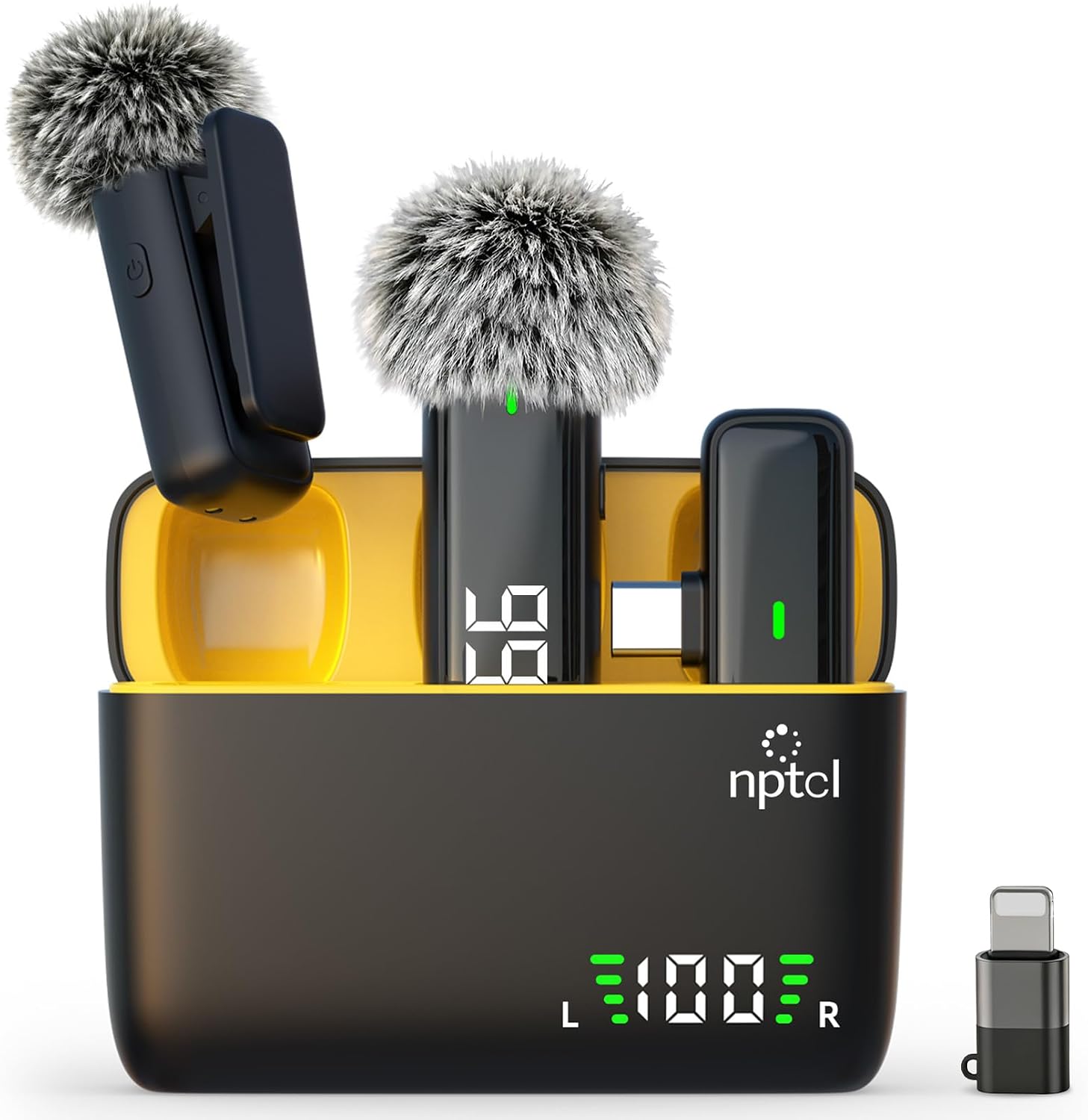
Budget pick: NPTCL Wireless Lavalier Microphone for iPhone iPad Android, Mini USB C Mic
 Visit on Amazon →
This is the phone-first option, and the listing covers iPhone, iPad, and Android with a mini USB-C connection on the receiver end. Check current Amazon price.
The case for it is simple. Wireless removes the cable, and the cable is the part of a lav setup that ruins takes. A wire running down your shirt transmits every hand movement, every chair shift, and every time you bump the table into the recording. Going wireless means you clip the transmitter on and forget it. For walk-and-talk shoots, cooking videos, or anything where you move, that is worth more than a slightly better capsule.
Flaws but not dealbreakers: Budget wireless lives and dies on radio. Systems in this class share air with your Wi-Fi, your neighbors' Wi-Fi, and every other device in the building, so read the recent reviews specifically for dropout complaints in apartments. It also has to be charged, which means it will be dead the one morning you forgot. Put it on the charger the night before, every time.
Anyone shooting interviews, walk-and-talk segments, or talking-head videos in a small apartment will get the most out of this one.
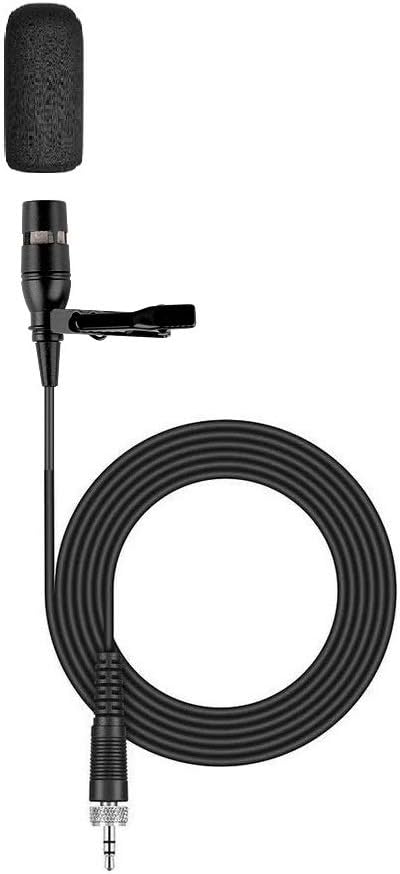
The wired pick: ikapok Clipmic Digital for Sennheiser ME 2-II Omnidirectional Lavalier Microphone (Black)
 Visit on Amazon →
The name tells you what this is: a clip-on lavalier built for Sennheiser's ME 2-II omnidirectional capsule, one of the best known interview lavs around. Check current Amazon price.
Here is why I'd point a serious beginner at this instead of another wireless kit. Wired means no battery to charge, no radio to drop out, and no receiver to lose in a bag. It works every single time you plug it in. For sit-down interviews, desk recording, and any shoot where the subject stays in a chair, the tether is a small price to pay for a signal that cannot be interrupted by somebody's microwave.
The omnidirectional part deserves a straight answer. An omnidirectional capsule picks up in every direction, which means it hears your voice and your room in equal measure. That is not a flaw you can shop your way out of, and it is exactly why this mic rewards good placement and a quiet room. Get it four to six inches below the chin and it sounds warm and full. Leave the AC running and it will faithfully record the AC.
Flaws but not dealbreakers: You are tethered, so this is not the mic for walking shots. And because it hears everything, it is honest about your room in a way that a cheap dynamic mic is not. If your fridge hums through the wall, you will hear it.
Anyone recording seated interviews, scratch voiceover, or course videos at a desk will be happy here.
Before you clip anything, fix these three things
The mic is the last thing to worry about. In order of how much they wreck your audio:
The room. Turn off the air conditioning, the fan, the dishwasher, and the fridge if you can reach the plug. Put your phone on airplane mode so it doesn't vibrate against the table. If your room is bare, hang a blanket behind the person speaking. That single blanket does more than a mic upgrade.
The clothing. Cotton t-shirts rustle. Starched collars scrape. A lapel or a button placket gives you a stable place to clip. Avoid scarves, lanyards, and anything that swings.
The gain. If you record too hot, you clip and there is no fixing it. If you record too quiet, you raise the noise floor when you fix it later. Aim for peaks around minus 12 to minus 6 dB and leave yourself headroom.
The actual setup workflow
This is the routine. It takes ten minutes and it works with either mic.
Step one: place the capsule. Four to six inches below the chin, off center toward one side of the chest, capsule pointed up toward the mouth. Closer than four inches and you get proximity effect, which is the bass boost you hear when a mic sits right against the lips. Farther than six and the room creeps back in.
Step two: loop the cable. Even on a wireless system, loop the cable once and tape or clip it down as strain relief. This is the cheapest fix there is for rustle and thumps.
Step three: kill the room. Run the checklist above before you hit record, not after.
Step four: set your levels. Say the loudest sentence you plan to say in the video, watch the meter, and set peaks around minus 12 dB. Then don't touch the gain again.
Step five: test the plosives. Say "Peter Piper picked a peck" directly at the mic. If the p's pop, angle the capsule slightly off-axis from your mouth. A pop filter helps, but angle fixes most of it for free.
Step six: record 20 seconds of room tone. Stand still and stay silent. You will use this in the edit to fill gaps and smooth cuts. Every editor you ever hire will thank you.
Step seven: monitor. Put one earbud in and listen while you record. If you can hear the fridge, so can the mic.
Step eight: record a backup. If the shoot matters, record the lav to the phone and let the phone's built-in mic run as a safety track. Two sources, one of which you'll never need.
The competition and why it lost
The built-in phone mic is the default and it is not good enough, because it is attached to the camera and the camera is not attached to your face.
An on-camera shotgun mic is better, but it still sits on the camera, so it still records the distance between the camera and your mouth. It is the right tool for ambient sound and the wrong tool for a talking head.
A desk USB mic is excellent if you sit at a desk and never move. The moment you stand up, it's a paperweight.
The XLR condenser plus audio interface path is the one people buy too early. It is a great path for a treated room, and a condenser in an untreated bedroom is a very expensive way to record your ceiling fan. If you know why you need that chain, you already know. If you don't, spend the money on a lav and a blanket.
What this all costs
Check current Amazon price on both of the mics above. Then do the math on what you're actually buying: not a microphone, but the removal of the two problems that make phone video sound amateur. The distance problem and the room problem.
Both of these live inside a sane first budget for a creator, and neither one requires an interface, a preamp, or a course to operate. The rest of the improvement is free. Blanket, fridge, airplane mode, four to six inches below the chin. That part costs nothing and it is most of the difference.
If you shoot once a month, the wireless one earns its place because you'll actually use it. If you shoot seated interviews at a desk, the wired one earns its place because it will never fail you.
That's the job. The microphone was never the problem. The distance was.